Edit Keys and Edit Format
Edit the keys of the message type
In XML schema it is possible to define keys. That is a set of elements whose values identify an element in its parent's context. In Orchestra this feature is used only if the message was imported from a database (see Import from Database). Actually keys in this case are the primary key, the unique keys and the foreign keys of the imported tables. This information is then used in the Database Target and the Database Source Reader.
To edit the keys you can expand Keys definition panel in the right sidebar
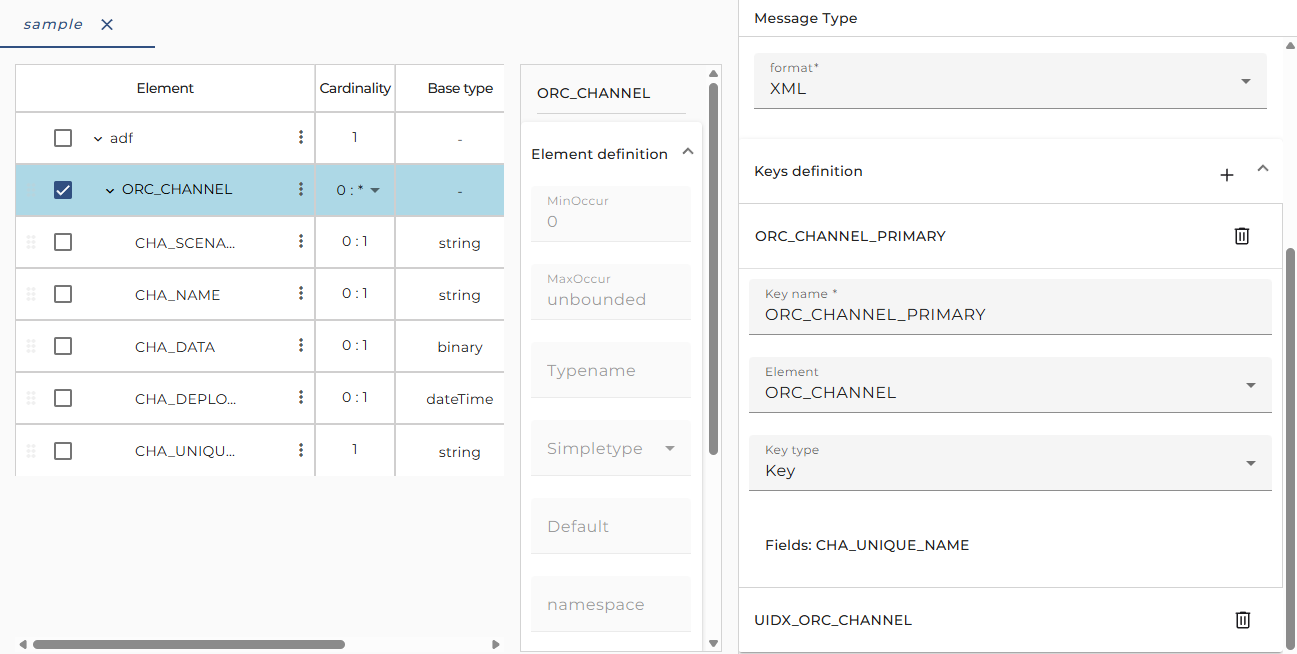
Typically, these keys are created automatically if you import a message from a database. But sometimes it may be necessary to define and edit keys here. This means that you define constraints for the messages having this message type; it doesn't change the database where the message was imported from.
If you click on Plus on keys definition header you can define a new key. A new key will add to the selected node of message type editor except following conditions:
- no node selected
- selected root node
- selected node that does not contain any children
Orchestra will hint a warning message and prevent the addition of a new key.
Edit the format of a message type
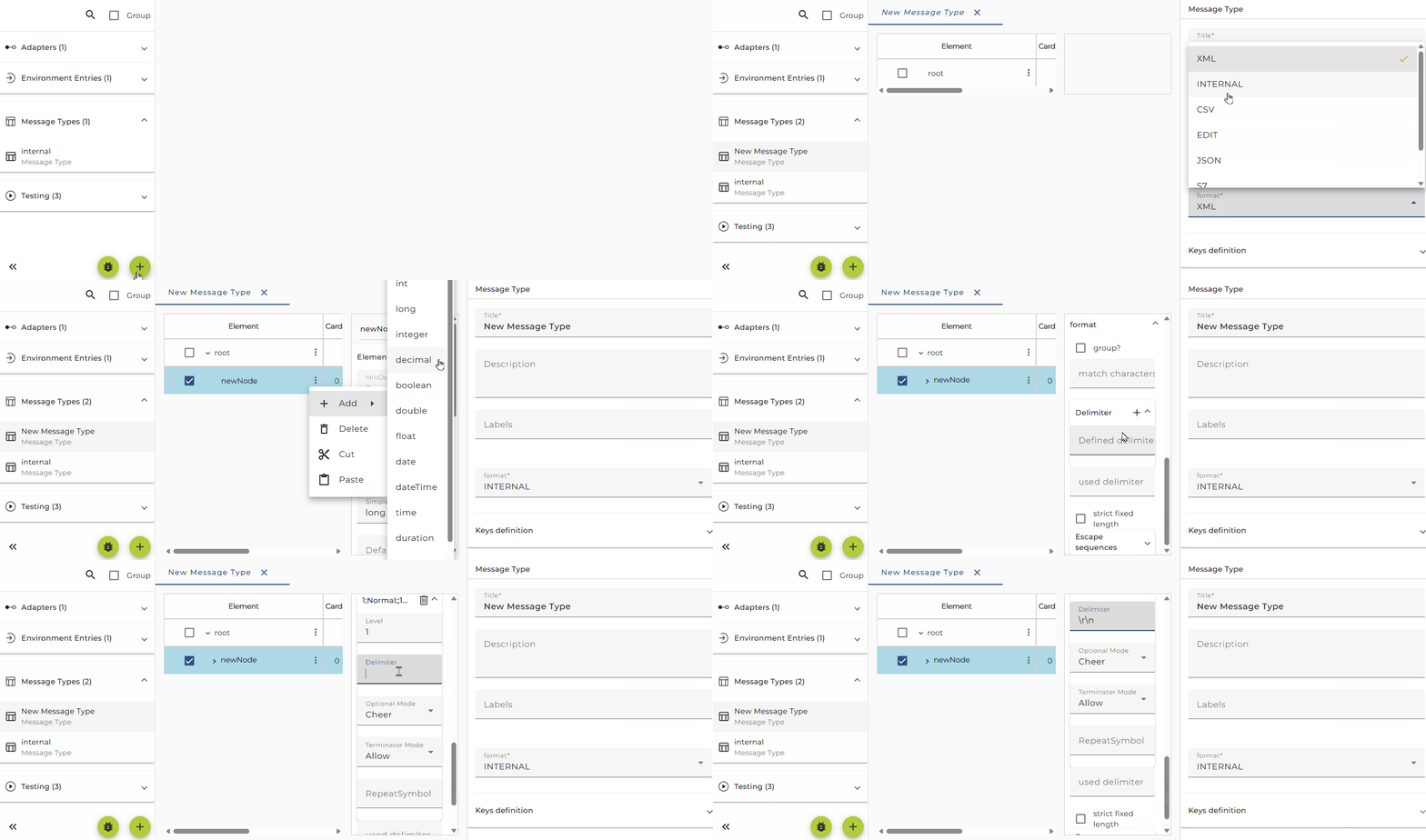
For a INTERNAL message format it is possible to define a set of delimiters. you can define delimiters via the Format properties.
The information you can edit with the Format is used from the Type based deserializer and the type based serializer to parse text files containing structured data and to create such files from a message.
You can change delimiters defined for the selected element itself and its sub elements (descendants).
The following picture shows the format of a message type consisting of three levels of information. When serializing messages of this type, the elements under the root node (the records) are delimited by a newline (carriage return and line feed). The elements in level 2 (the fields) are delimited by a pipe, and subfields are delimited by a circumflex.
Typically the delimiters for the levels of a structured message are all defined in the root node. In very rare cases it may be necessary to change the delimiters for one special node. In this case you have to select that node, add delimiter. See Type based serializer and Type based deserializer for details about how to work with internal message types.
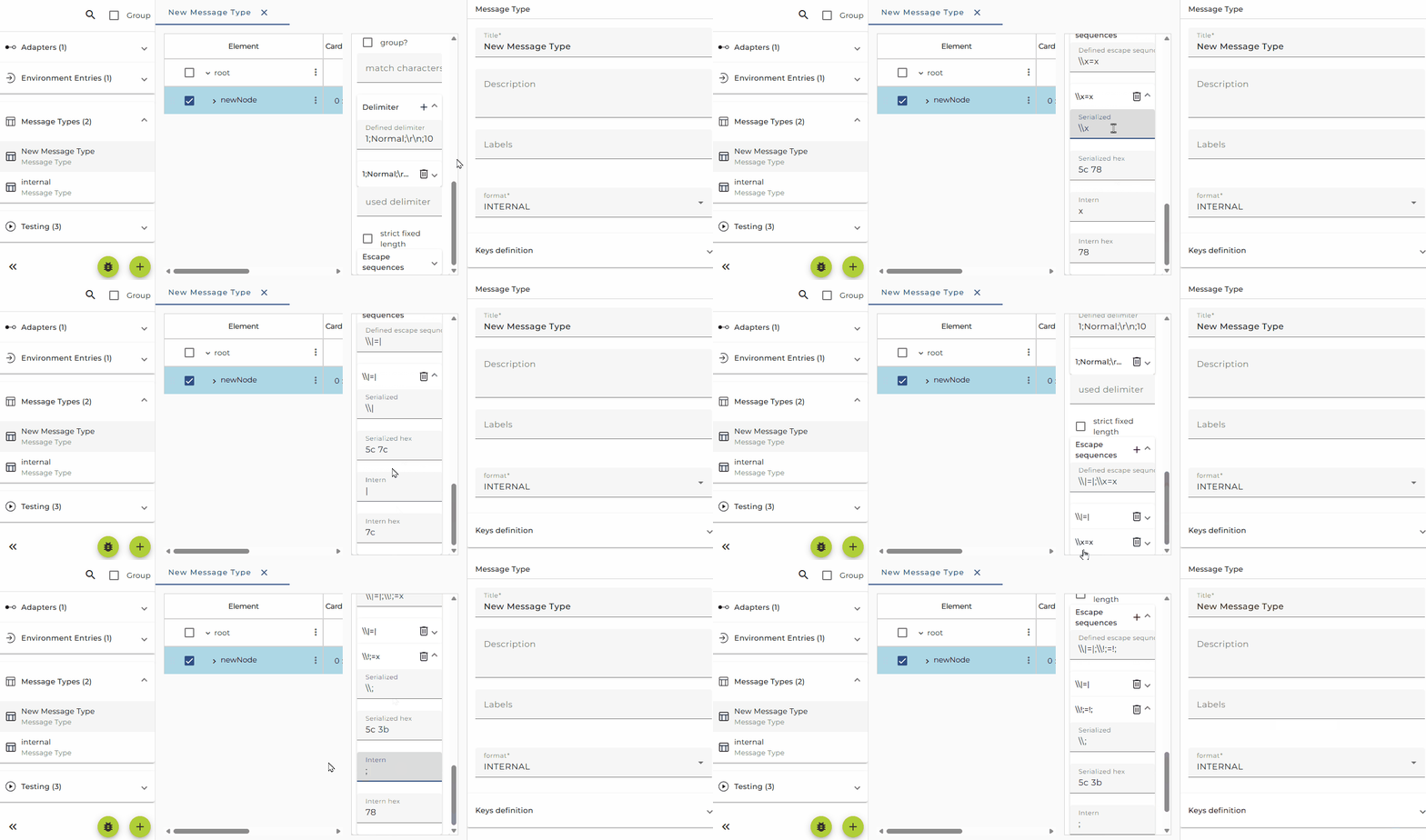
To include your delimiter inside your string literal your need to escape it. The backslash (\) is used as escape character in Orchestra. If you need to escape a backslash for itself you need to use it twice. Check the examples in the figure above. Here you can see escaping of a Pipe, Asterisk, semicolon, backslash and a CRLF (carriage return line feed)
Example:
If a message of this type (see figure above) is serialized the result may look like
PD001|Georg|Maier|12;11,1987
ADR|86150|Augsburg|Hoher Weg;1
TEL|0821|345678
TEL|0711|456789
PD012|Andreas|Müller|01;10;1969
ADR|86150|Augsburg|Ludwigstrasse;3
Format editor Command Buttons
| Command | Action |
|---|---|
| Add (delimiter level) | Adds a new level after the selected level. |
| Remove (delimiter level) | Deletes the selected line item (level) from the list. |
| Add (escape sequence) | Adds a new escape sequence after the selected line. |
| Remove (escape sequence) | Deletes the selected line item (sequence) from the list. |
Delimiter Properties
| Property | Description |
|---|---|
| Level | Assigns consecutive sets of delimiter parameters to delimited nodes in the Encoder node hierarchy. |
| Delimiter | any alphanumeric sign(s) also control characters e.g. \r \n |
| Optional mode | Specifies how delimiters for optional nodes are to be handled when the nodes are absent from the input instance or when their fields are empty. (See Optional mode for additional information.) Note: Does not apply to children of choice element nodes |
| Terminator mode | Specifies how delimiters are to be handled for a specific terminator node. (See Terminator mode for additional information.) |
| Repeat symbol | any alphanumeric sign(s), a repeat delimiter is used delimit the repetitive occurrences. Example: a^b^c1*c2*c3*c4^ means * delimits repetitive nodes and ^ is a normal delimiter that terminates repetitive nodes. |
Escape sequence Properties (this Table acts like a translation table)
| Property | Description |
|---|---|
| Serialized | character sequence to escape a delimiter in the serialized external form of the input message |
| Serialized hex | hexadecimal representation of the serialized form ( filled automatically) |
| Intern | DOM tree representation of character sequence |
| Intern hex | hexadecimal representation DOM tree character sequence (filled automatically) |
Optional mode Options
| Option | Description | Input | Output |
|---|---|---|---|
| Never | If the node is absent, the delimiter is not allowed in either input or output. | E1: b*d^ E2: b^ | E1: b*d^ E2: b^ |
| Allow | If the node is absent, the delimiter is allowed in input but will not be emitted in output. | E1: b**d^ E2: b^, b*^ or b**^ | E1: b*d^ E2: b^ |
| Cheer | If the node is absent, the delimiter is allowed in input and will also be emitted in output. | E1: b**d^ E2: b^, b*^ or b**^ | E1: b**d^ E2: b**^ |
| Force | If the node is absent, the delimiter must appear in input and will be emitted in output. Note: Only this option allows trailing delimiters for a sequence of absent optional nodes. | E1: b**d^ E2: b**^ | E1: b**d^ E2: b**^ |
As examples, consider the structures, where the node a has a caret (^) as its delimiter, and the child nodes b, c, and d all have asterisks (*) as their delimiters.
Example 1: Child node c is optional. (Child nodes c and d must have different values for the match parameter.) [ a^b*c?*d? ]
Example 2: Child nodes c and d are both optional. [ a^b*c?*d ]
Terminator mode Options
| Option | Description | Input | Output |
|---|---|---|---|
| Never | Specifies that the delimiter is not allowed to be a terminator in input and will not be emitted as terminator in output. | c^ | c^ |
| Allow | Specifies that the delimiter is allowed to be a terminator in input but will not be emitted as terminator in output. | c^ or c*^ | c^ |
| Cheer | Specifies that the delimiter is allowed to be a terminator in input and will be emitted as terminator in output. | c^ or c*^ | c*^ |
| Force | Specifies that the delimiter must appear as a terminator in input and will also be emitted as terminator in output. | c*^ | c*^ |
Consider the structures, where the node a has a caret (^) as its delimiter, and its child nodes b and c have asterisks (*) as their delimiters. [ a^b*c* ].